
Welcome sa Table Game! Explore ang exciting world of online casino games, mula sa colorful slots at action-packed fishing games hanggang sa classic bingo entertainment.
Discover available games, check the latest Table Game bonuses, at alamin kung paano mag-register, mag-manage ng account, at gumamit ng payment options.
Whether you’re exploring online games for the first time or familiar ka na sa casino entertainment, makikita mo rito ang game information at guides na kailangan mo.
Discover slots, fishing, bingo, at iba pang games available sa Table Game.
Alamin ang latest registration, deposit, cashback, at loyalty promotions.
Browse Table Game on your phone at i-access ang account at games wherever the service is available.
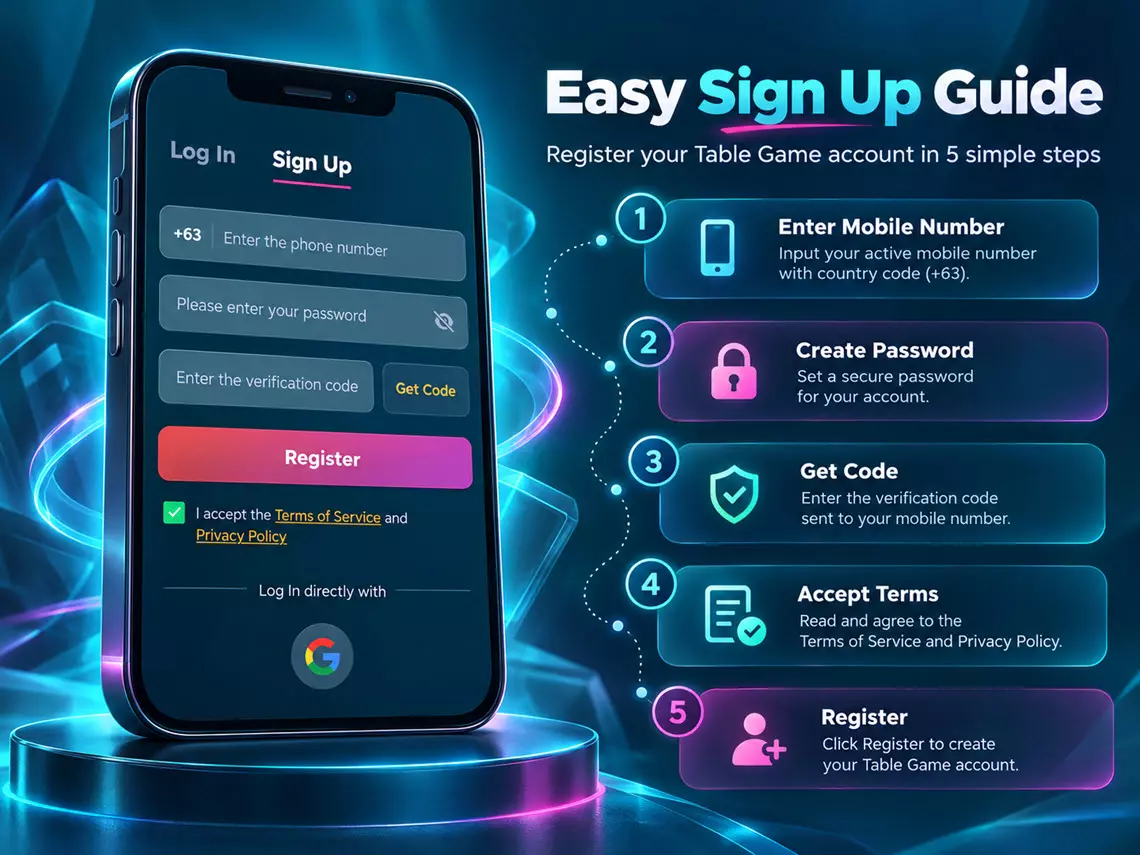
New to Table Game? Madali lang gumawa ng account gamit ang iyong Philippine mobile number!
Follow our step-by-step Table Game registration guide para malaman kung paano mag-sign up, mag-set ng password, at kumpletuhin ang mobile verification process.
Visit the official Table Game website at www.table-game.app. Click Sign Up para buksan ang registration form.
Enter your active mobile number sa phone number field. The country code +63 is already displayed, kaya ilagay ang iyong mobile number ayon sa required format. Make sure na tama ang number na ginagamit mo para matanggap ang verification code.
Enter your preferred password sa Please enter your password field. Choose a strong password para maprotektahan ang iyong Table Game account. You can use the eye icon to show or hide your password while typing.
Click the Get Code button beside the verification code field. Once you receive your verification code, enter it sa Enter the verification code field. Make sure na tama ang code bago mag-proceed. Never share your verification code with anyone.
Review the Terms of Service and Privacy Policy. Make sure naka-check ang agreement checkbox, then click Register to submit your registration. Follow any additional on-screen instructions if required.
Kung may account ka na, click Log In sa registration window to access your existing account. You can also choose Log In directly with Google if you prefer using the available Google sign-in option.
21+ Only. Play responsibly.
Want to access Table Game on your Android phone? Download the official Table Game APK directly from our website! Explore available slots, fishing, bingo, at iba pang Table Game features gamit ang iyong Android device. Hindi mo na kailangang maghanap sa third-party websites. Get the APK from the official Table Game website at sundin ang installation guide below.
Access Table Game games and account features directly from your Android phone.
Browse available slots, fishing, bingo, at iba pang gaming categories.
Check the latest Table Game bonuses, cashback offers, at member rewards.
Open the app to log in, manage your account, at review available services.
First time mag-install ng APK? No worries! Follow these steps para ma-download at ma-install ang Table Game app on your Android device.
Open Google Chrome or your preferred browser on your Android phone. Go to https://www.table-game.app/ and make sure na tama ang website address.
Tap the Download Table Game APK button on this page. Wait for the APK file to finish downloading. Makikita mo ang file sa Downloads folder ng iyong phone. Make sure na galing ang APK sa official Table Game website, not from unknown links or third-party sources.
Open your phone’s Files or Downloads app. Find the downloaded Table Game APK file and tap it to start the installation.
Some Android phones require permission bago mag-install ng APK downloaded outside Google Play. If prompted, tap Settings and look for Allow from this source. You may also find this option under:
Settings → Apps → Special app access → Install unknown apps
Select the app you’re using to open the APK, such as Chrome or Files, then enable Allow from this source.
Note: Settings may look different depending on your Android version and phone brand. Enable this permission only after verifying the APK source. If Android or Google Play Protect identifies a security risk, stop the installation and contact official support.
Return to the downloaded APK file. Tap Install and wait for the installation to finish. Once completed, tap Open to launch the Table Game app. For added security, turn off Allow from this source after installation.
Hanapin ang Table Game app icon sa iyong phone. Open the app and log in using your registered Table Game account.
New to Table Game? You can check the registration requirements and create an account if you’re eligible.
The Table Game APK is designed for Android devices and cannot be installed on an iPhone. If you’re an iPhone user, puwede mong i-access ang Table Game website through Safari.
Now, you can tap the Table Game icon on your Home Screen to access the website.
Table Game is intended for eligible adults aged 21 and above. Play responsibly.

Looking for different types of online casino entertainment sa Pilipinas?
Sa Table Game, puwede mong i-explore ang iba’t ibang game categories at piliin kung anong gaming experience ang mas interesting para sa iyo.
Learn about the gameplay, features, at rules bago sumali sa anumang real-money game.
Explore colorful slot games with different themes, reels, symbols, at bonus features.
Whether you enjoy classic slot formats or modern video slots, check ang available games at basahin ang paytable, rules, at game information.
Dive into the world of online fishing arcade games!
Discover different fish targets, game mechanics, at interactive underwater themes. Alamin kung paano gumagana ang scoring, bet settings, at special game features.
Enjoy the familiar excitement of bingo in an online gaming format.
Check available bingo games, card rules, matching mechanics, at round information para maintindihan ang bawat game.
Interested ka sa iba pang casino game experiences?
Browse the full Table Game game lobby para makita ang additional game categories, gameplay instructions, at available options.
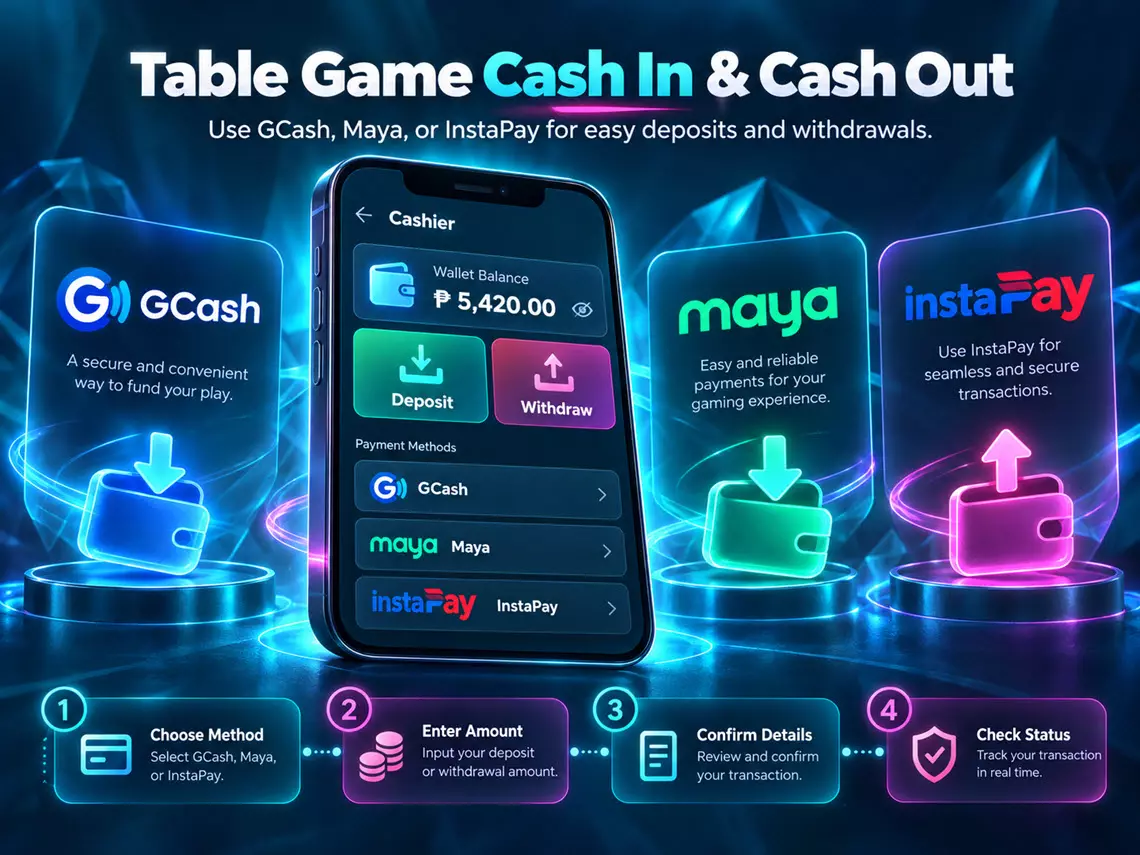
Looking for a convenient way to deposit or withdraw funds sa Table Game?
Table Game supports GCash, Maya, and InstaPay for cash-in and cash-out transactions in the Philippines.
Whether you prefer using your e-wallet or a participating bank account, piliin ang payment method na suitable para sa iyo and follow the instructions in your Table Game account.


Want to add funds to your Table Game account? Follow these steps:
Visit the official Table Game website and log in using your registered account.
Open the Cashier or Wallet section, then choose Deposit / Cash In.
Select your preferred payment method: GCash, Maya or InstaPay
Enter the amount you want to deposit. Review the applicable minimum and maximum amounts, payment details, at possible transaction fees bago mag-proceed. Follow the instructions shown for your selected payment method.
Confirm the payment through the required payment channel.
After completing the transaction, return to Table Game and check your account balance or transaction history. If the payment is still pending, check its status before attempting another deposit.
Ready to request a withdrawal? Here’s how to submit a cash-out request using GCash, Maya, or InstaPay.
Sign in to your Table Game account. Go to the Cashier / Wallet section and select Withdraw / Cash Out.
Select one of the supported options: GCash, Maya or InstaPay Withdrawal
Make sure na accessible at eligible ang iyong receiving account.
Enter the amount you want to withdraw and the required receiving account information. Double-check your mobile wallet number, bank account details, or other requested information before submitting. Review any applicable withdrawal limits, fees, and verification requirements.
Submit your withdrawal request and wait for the transaction status update.
Withdrawal processing times may vary depending on account verification, payment method, and transaction checks. You can review your withdrawal status through the available account features or contact official Table Game customer support for assistance.
Payment Notice: All transactions are subject to applicable payment limits, account verification, security checks, and processing requirements.
21+ Only. Play responsibly. Never gamble with money you cannot afford to lose.
New sa Table Game? Discover the ₱13 registration bonus offer for eligible new members.
Alamin ang registration requirements, bonus conditions, at kung paano maging eligible sa welcome promotion.
Explore ang Table Game 2.7% Unlimited Cashback promotion!
Check kung aling games at transactions ang eligible, paano kino-compute ang cashback, at kung kailan ito maaaring ma-claim.
Make time to check the Table Game daily rewards!
Discover ang ₱67 Daily Check-In Bonus promotion at tingnan ang requirements para sa eligible members.
Planning your first deposit? Alamin ang Table Game First Deposit Bonus na may advertised offer na up to ₱2,500.
Review the qualifying deposit amount, bonus calculation, at wagering requirements bago mag-claim.
Discover the Table Game VIP Upgrade Bonus promotion na may advertised reward amount na ₱66,767.
Explore ang VIP membership levels, upgrade qualifications, at reward conditions para malaman kung paano gumagana ang loyalty program.
Share Table Game with friends na eligible at interested sa online gaming.
Explore ang Invite & Earn ₱3,200 Bonus promotion, referral qualifications, at reward rules before participating.
All Table Game bonuses are subject to eligibility, valid promotion periods, wagering requirements, limits, and official terms and conditions. Promotional amounts do not represent guaranteed cash winnings.
Table Game is an online casino gaming brand for eligible adult players in the Philippines, featuring games such as slots, fishing, at bingo.
Ang bagong official website ng Table Game ay https://www.table-game.app/. Dito mo makikita ang available games, promotions, account features, at important gaming information.
Always check the website address before logging in or making transactions.
Madali lang mag-register sa Table Game! Follow these steps:
Follow any additional verification instructions if required. Registration is available only to eligible users aged 21 and above.
To access your Table Game account, visit the official website and click Log In. Enter your registered login credentials and follow the instructions.
May “Log In directly with Google” option din sa Table Game login window. You can select this option to use the available Google sign-in process.
For account access issues, contact official Table Game customer support. Never share your password or verification codes.
You can download the Table Game Android APK directly from the official website.
Here’s how:
For security, download only from the verified official website, keep Google Play Protect enabled, and do not bypass security warnings. Turn off the installation permission afterward if you enabled it.
Yes, you can access the Table Game website using Safari on a compatible iPhone.
To create a Home Screen shortcut:
The Table Game APK is for Android devices only and cannot be installed on iOS. The Home Screen shortcut opens the Table Game website; it is not an Android APK installation.
Table Game offers different online gaming categories for eligible adult players in the Philippines.
Explore available games such as:
Visit the Table Game game lobby para makita ang currently available titles, rules, at game features.
Table Game promotional offers include:
Para malaman kung paano maging eligible, visit the Table Game Promotions section and check the latest terms and conditions.
All bonuses are subject to applicable eligibility requirements, promotion periods, wagering conditions, and other rules. Promotional amounts are not guaranteed cash winnings.
Table Game supports GCash, Maya, and InstaPay for deposit transactions in the Philippines.
To cash in:
GCash and Maya are e-wallet services, while InstaPay is an electronic fund transfer service used by participating banks and e-money institutions.
Check your transaction status and Table Game account balance after completing your deposit.
Table Game supports withdrawals through GCash, Maya, and InstaPay, subject to applicable account and payment requirements.
To request a cash out:
Make sure tama ang iyong GCash or Maya wallet number, bank account details, at iba pang required information.
You can check your withdrawal status through the available account features or contact official Table Game customer support if you need assistance.
Table Game withdrawal processing times may vary depending on your selected payment method, account verification, transaction checks, and payment provider.
Although InstaPay supports real-time fund transfers, this does not mean every Table Game withdrawal will be processed or approved instantly.
Minimum and maximum deposit or withdrawal amounts, applicable fees, and transaction limits may also vary.
Before confirming any cash-in or cash-out request, check the latest payment information in your Table Game account.
Kung may pending or unsuccessful transaction ka, contact official Table Game customer support for assistance.
Table Game is intended for eligible adults aged 21 and above. Gambling involves financial risks. Play responsibly, set your limits, at huwag gamitin ang perang kailangan para sa daily expenses.
